Reels with context
Original-language speech, timestamps and sampled frames give your assistant concrete evidence.
 Obscura MCP
Instagram · Model Context Protocol
Your Reels. Your language. Actual context.
Connect your personal Instagram account to an AI assistant. Bring together saved posts, multilingual speech and the frames that explain the story.
From saved to understood
Original-language speech, timestamps and sampled frames give your assistant concrete evidence.
Read the loaded saved grid, inspect a post or compare carousel images and captions.
Visible manual login, Obscura-only account access and offline FFmpeg/Whisper analysis.
“Open my saved posts. Take the first Reel and explain what happens and what they say.”
Workflow example, not a screenshot of a real account. Your assistant supplies the visual interpretation and translation.
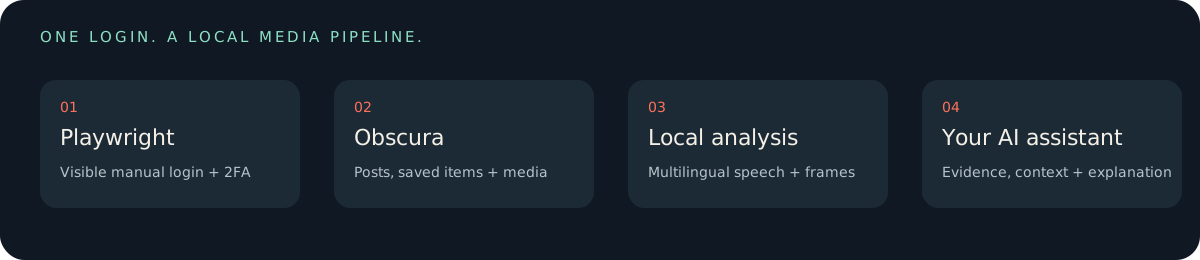
Playwright opens a visible window for your manual login and 2FA, then closes. All subsequent Instagram and CDN access goes through Obscura. No hidden browser fallback.
Source install · Python 3.12+
git clone https://github.com/votsie/instagram-obscura-mcp.git
cd instagram-obscura-mcp
python -m venv .venv
# Activate .venv, then:
python -m pip install ".[analysis]"
instagram-mcp-doctor
Install Chrome, FFmpeg, a pinned Obscura binary and a local multilingual speech model. Setup downloads are explicit; model weights are not fetched during MCP tool calls.
Read the installation guide →Experimental and unofficial. Windows has real-engine validation. Instagram compatibility varies. Account actions require specific authorization; uploads are disabled by default.
Learn how to get the original speech transcript and inspect representative frames in the Instagram Reel analysis guide.
No. This is a browser-based personal-account workflow, not a Graph API integration.
It uses multilingual Whisper with automatic detection. Coverage and accuracy vary; the host assistant handles explanation, translation and on-screen text.
It exposes account-checked UI primitives. Dedicated send/publish APIs are not provided, and real sends/publications were not release-tested. Verify each requested operation.
The repository contains no sessions, saved-post data or downloaded media. Your local runtime persists private cookies and artifacts; protect it and review the threat model.
A practical tool reference, a reusable agent skill, AGENTS.md and llms.txt document the boundaries as well as the capabilities. English by default, with a full Russian entry point.